Ad: this guide contains affiliate links. If you buy through them we may earn commission, at no extra cost to you.
Electronics
Cyber Monday tech checklist: power banks, mesh Wi-Fi and smart home
A practical Cyber Monday checklist for power banks, jump starters, mesh Wi-Fi, security cameras and tracker tags, so you buy tech that fits your home.
By Daily Offer Deals editorial teamUpdated 5 min read
On this page 11 sections
Quick answer
On Cyber Monday (Monday 30 November 2026), focus on tech that solves a problem you already have. For power banks, match the capacity and charging speed to your devices. For mesh Wi-Fi, count the rooms and floors you need to cover and check your devices’ Wi-Fi standard. For smart home gear, check compatibility with your phone and existing setup, and look at any ongoing subscription costs before you buy.
Why make a checklist?
Cyber Monday is busy and fast-moving. A short checklist stops you buying gadgets you won’t use and helps you compare like-for-like. It also helps you avoid the classic trap of buying a cheaper version that doesn’t quite do the job.

Power banks
What to look for
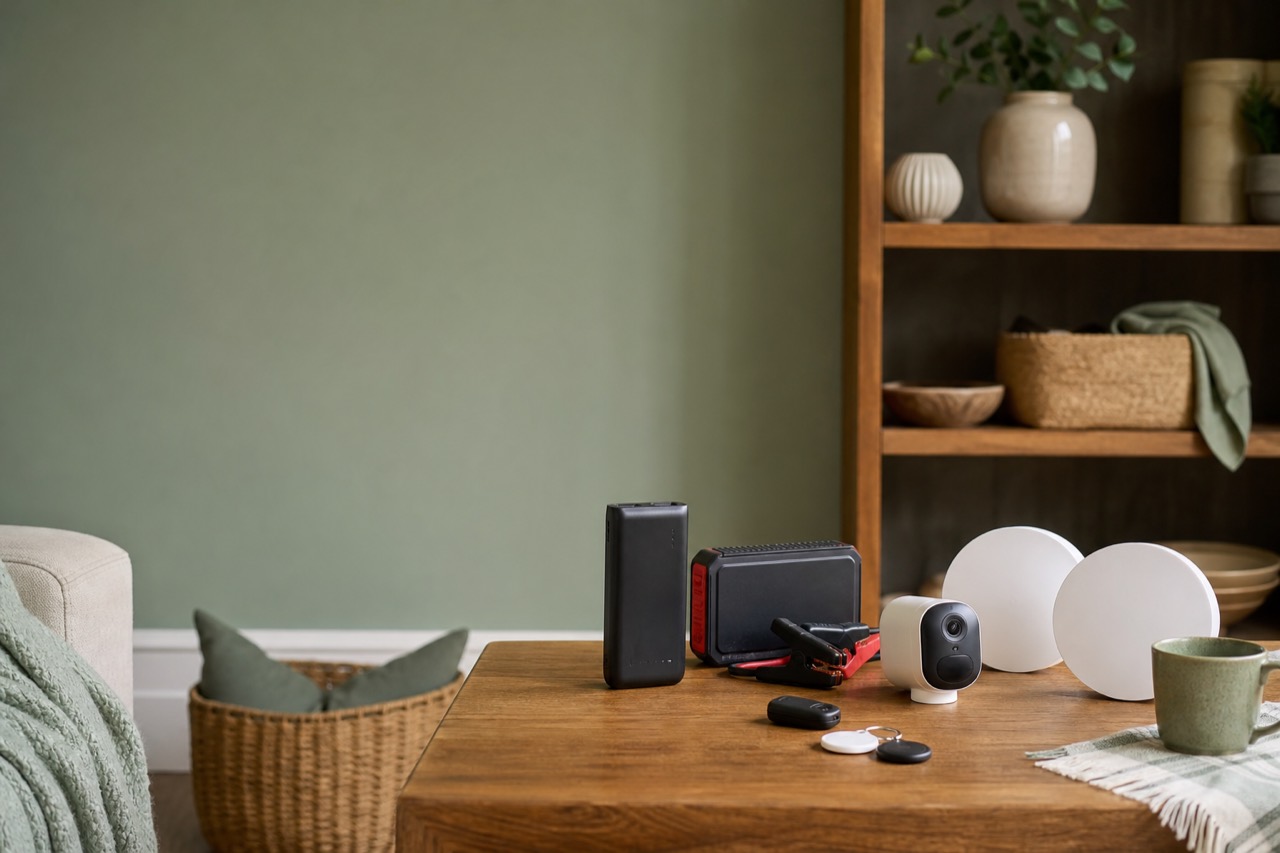
- Capacity (mAh). Bigger numbers store more charge, but add weight. 10,000mAh is a common pocket size, while 20,000mAh suits longer trips or charging more than one device.
- Output (W). Higher wattage means faster charging if your device supports it. Laptops and tablets usually need more power than phones.
- Ports. Check how many USB-C and USB-A ports you need, and whether the cable you need is included.
- Flying. Airlines have rules on carrying power banks, usually in hand luggage only, with limits on capacity. Check with your airline before you travel.
Car jump starters
A jump starter with a built-in power bank can be a handy winter backup for drivers. Check it suits your engine type and size, and keep it charged, as a flat jump starter won’t help on a frosty morning.
Mesh Wi-Fi
Do you need mesh?
If you have rooms where Wi-Fi drops out, a mesh system can help. Instead of one router trying to cover the whole house, mesh uses several units that work together as one network.
What to look for
- Coverage. How many units do you need? Larger homes, thick walls and multiple floors usually need more.
- Wi-Fi standard. Wi-Fi 6E adds the 6GHz band, which can help in busy homes, but only devices that support Wi-Fi 6E can use it. Check your phone and laptop.
- Wired backhaul. If you can connect units with Ethernet cable, you may get better performance.
- Setup and app. Look for clear app controls, parental controls and easy firmware updates.
- Your broadband router. Check whether you’ll use mesh alongside your provider’s router or replace its Wi-Fi.
Smart home and security
Security cameras
Ask yourself:
- Indoor or outdoor? Outdoor cameras need weather resistance.
- Wired or wireless? Wireless is easier to install but needs charging or a power source.
- Storage. Does it store footage locally, in the cloud, or both? Cloud storage may need a subscription.
- Privacy. Point cameras at your own property and be mindful of neighbours. The ICO has guidance on domestic CCTV if your camera captures images beyond your boundary.
Tracker tags
Tracker tags help you find keys, bags and luggage. The key thing to check is compatibility: some work with Apple Find My, others with Android. Buy tags that match your phone.
Cyber Monday tech checklist
| Category | Must check | Nice to have |
|---|---|---|
| Power bank | Capacity, output wattage, ports | Display showing remaining charge |
| Car jump starter | Suits your engine, stays charged | USB ports for phones |
| Mesh Wi-Fi | Coverage, units, Wi-Fi standard | Ethernet ports for wired backhaul |
| Security camera | Indoor or outdoor, storage, power | Local storage without subscription |
| Tracker tags | Phone ecosystem compatibility | Replaceable battery |

Featured Cyber Monday deals
| Product | Best for | What to look for | Deal |
|---|---|---|---|
| INIU 20000mAh Power Bank, 45W Fast Charging | Travel and long days out | 45W support on your devices | INIU 20000mAh Power Bank |
| AstroAI Car Jump Starter Power Bank | Drivers wanting a winter backup | Suitability for your engine | AstroAI Jump Starter |
| TP-Link Deco AXE5400 Pro Mesh Wi-Fi 6E System | Homes with Wi-Fi dead spots | Units needed and Wi-Fi 6E devices | TP-Link Deco AXE5400 Pro |
| eufyCam C35 Wireless Security Camera | Indoor and outdoor monitoring | Storage options and placement | eufyCam C35 |
| UGREEN FineTrack Tracker Tags, 4 Pack | iPhone users | Apple Find My compatibility | UGREEN FineTrack Tags |
Deals can change quickly over Cyber Monday, so check each deal page for current details before you buy.
Before you click buy
- Check compatibility with your phone, devices and broadband.
- Look for ongoing costs, such as camera storage subscriptions.
- Compare the exact model, as similar-sounding products can have different features.
- Check the seller and the returns policy, especially on marketplaces.
- Set a budget and include any cables or accessories you’ll need.
Setting up your new tech safely
- Change default passwords and use a strong, unique password for each account.
- Turn on two-factor authentication where the app offers it.
- Update firmware when prompted. UK law now requires many connectable consumer products to meet basic security rules, such as no universal default passwords, but keeping devices updated is still up to you.
- Review privacy settings in each app, including sharing and recording options.
Looking after batteries
Power banks and jump starters use lithium batteries, so treat them with a little care. Store them somewhere cool and dry, rather than in a hot car in summer or on a sunny windowsill. Use a good-quality cable and charger, and stop using any battery that swells, gets unusually hot or smells odd. When it reaches the end of its life, take it to a battery recycling point rather than putting it in household rubbish, as damaged lithium batteries can cause fires in bin lorries and recycling centres. Many supermarkets and local tips have collection points.
FAQ
What size power bank do I need?
For topping up a phone during the day, around 10,000mAh is usually plenty. For trips, charging more than one device, or tablets, a 20,000mAh model gives more headroom. Check your devices’ charging requirements for the right wattage.
Is mesh Wi-Fi better than a range extender?
For many homes, yes. Mesh systems create one seamless network, while extenders can create separate networks and may reduce speeds. For a single weak room, an extender might be enough.
Do I need Wi-Fi 6E?
Only if some of your devices support it and you want the extra 6GHz band. Older devices will still connect using other bands.
Do security cameras need a subscription?
Some do, for cloud storage or advanced features. Others offer local storage. Check the product details so you know the full cost.
About the author
Daily Offer Deals editorial team
The Daily Offer Deals team checks UK deals by hand and writes practical buying guides. We never claim hands-on testing we have not done.