Ad: affiliate link, we earn a commission if you buy Sold by CCL
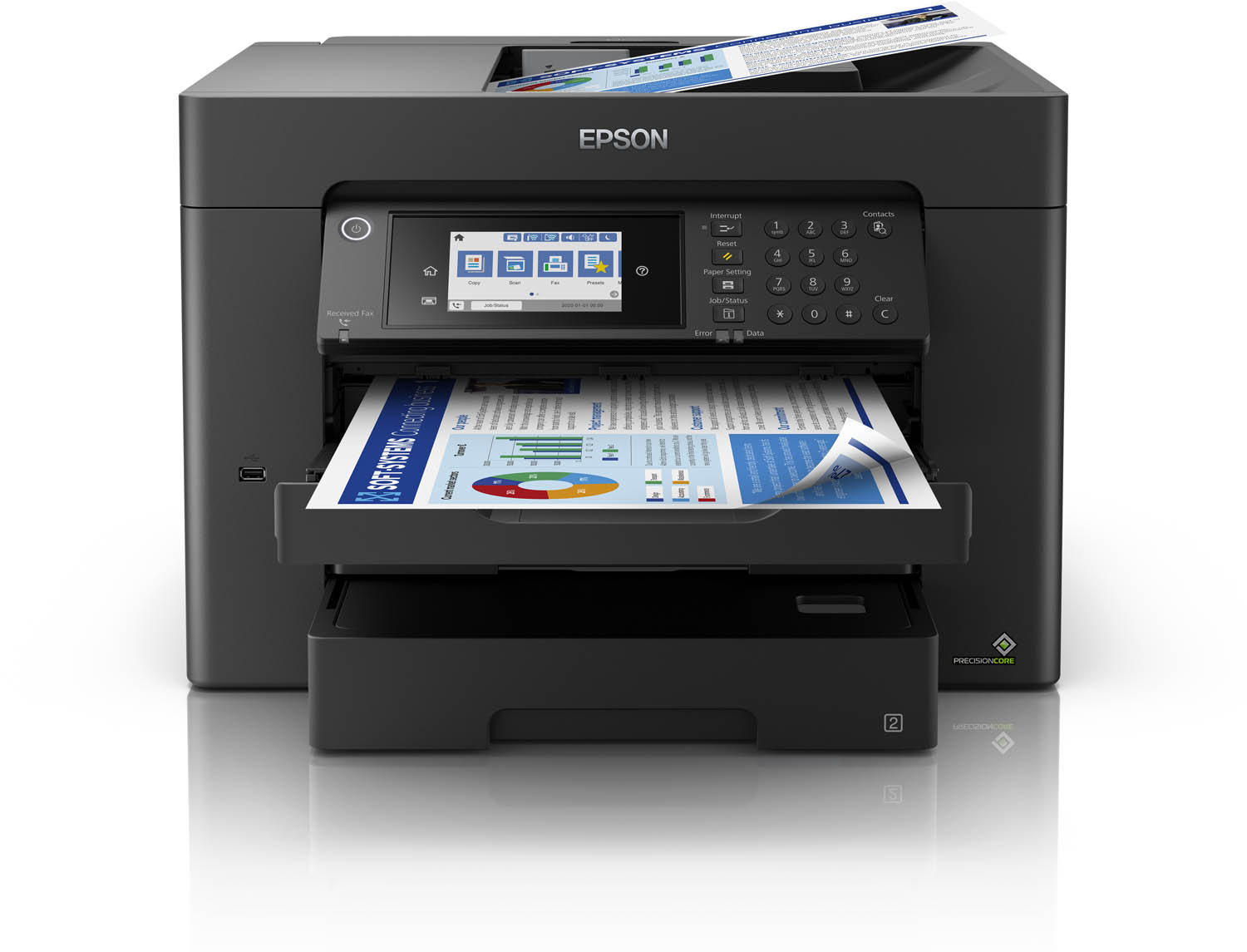
Epson WorkForce WF-7840DTWF A3+ Multifunction Printer
Brand: Epson
£298.99
- In stock at CCL when we last checked
- Price checked from CCL’s feed · Price history · How we check prices
Ad · affiliate link: we earn a commission if you buy, at no extra cost to you. How we make money
Epson WorkForce WF-7840DTWF A3+ Multifunction Printer is £298.99 at CCL (price checked ).
Price history
Is this a good deal?
We started tracking this price on 16 Nov 2026.
- Current price
- £298.99
- recorded 16 Nov 2026
- Lowest recorded
- £298.99
- 16 Nov 2026
The longer we track it, the more this verdict can tell you.
Tracked since
Show the prices as a table
| Date | Price |
|---|---|
| 16 Nov 2026 | £298.99 |
Key facts
| Brand | Epson |
|---|---|
| Category | Electronics |
| Store | CCL |
| EAN / GTIN | 8715946668383 |
| Part number (MPN) | PRT4442 |
| Condition | New |
Details come from the retailer’s product feed. Check the retailer’s page before you buy.
Description
Expand your potential with this A3+ multifunction inkjet. It offers high-quality, low-cost-printing and flexible wireless solutions. A3 duplex multifunction 50 page A3 duplex ADF Up to 25ppm speeds 1 Think big with this high-quality multifunction with double-sided printing, copying and scanning all up to A3. You’ll stride through tasks with print speeds of up to 25ppm 1 in black and a 50 page A3 automatic document feeder (ADF). And that’s not forgetting its cost-effective inks and flexible wireless connectivity solutions such as and Scan-to-cloud 2 . Professional A3+ printing This A3+ multifunction printer will meet the needs of even the most demanding home office and small office users. It offers double-sided (duplex) printing, scanning and faxing all up to A3, plus its automatic document feeder can process up to 50 double-sided A3 pages. Furthermore, its PrecisionCore printhead produces high-quality, laser-like prints. Enhance your productivity This efficient, reliable and fast model offers print speeds of 25ppm in black and 12ppm in colour 1 . It’s also simple to operate directly thanks to its intuitive user interface and 10.9cm touchscreen. This model also features 2 x 250 paper trays and an additional 50 sheet rear paper tray. Minimise your outgoings Dramatically reduce your costs; this printer is compatible with individual inks which are are 50% more efficient compared to tri-colour cartridges 3 . Giving great value for money, cartridges are available in standard, XL and XXL, with the highest yield delivering up to 1,100 pages 4 . Flexible wireless solutions Print from anywhere in the office with Wi-Fi connectivity or use Wi-Fi Direct to print from compatible wireless devices without a Wi-Fi network. Epson's free mobile printing apps and solutions provide further versatility; Email Print allows you to send items to print from almost anywhere in the world 2 . And with Scan-to-Cloud, you can enjoy the benefits of collaborative working 2 . 1. Determined in accordance with ISO/IEC 24734 showing the average of ESAT from the Office Category Test for default A4 simplex. For more information, please visit www.epson.eu/testing 2. Epson iPrint requires a wireless connection and the Epson printing app. Epson Email print, Epson Remote Print Driver and Epson Scan-to-Cloud require an internet connection. For more information, supported languages and devices, please visit www.epsonconnect.eu 3. Based on testing carried out by BLI in July 2019, compared to equivalent competitor (HP and Canon) printer models, using tri-colour cartridges, according to the manufacturers’ websites, July 2018. Weighting for Document and Photo printing applied based on TNS 'Printing Usage & Attitudes Study', June 2013. 4. Approx. page yield based on ISO/IEC 24711/24712. Actual yield will vary depending on images printed and usage conditions. For more information visit www.epson.eu/pageyield WARNING: when printing on glossy photo paper ink drying time will be considerably extended. Drying times depends also on humidity, temperature and other conditions. Do not touch the printed side until ink is completely dry. Moisture and oils from your skin can also affect print quality. Even after dry, avoid rubbing or scratching the surface of the printed paper.For Photo printing, Matte Photo paper is recommended
Description supplied by CCL.
About this deal
- Last checked
- Price
- From the retailer’s product feed.
- Price history
- See the recorded prices of this deal
Prices and availability can change. Check the retailer’s page before you buy.
Electronics
Similar deals
Buying help
Advice before you buy, and more places to look.
- Buying guideBlack Friday for students 2026: best laptop, headphones and kitchen starter picks on a budget
- Buying guideLaptop vs Chromebook vs tablet: which to buy (UK, Black Friday 2026)
- Buying guideSmart plugs, smart thermostats and energy monitors: do they actually save money?
- Seasonal buying pageBlack Friday electronics
- Product finderLaptops and computing
Ad: affiliate link, we earn a commission if you buySearch on AmazonOpens Amazon’s own results. We don’t show Amazon prices.